Photo Recover Fast
- 4.0
- Rating
- 100.00K
- Installs
- Free
- Price

 Analysis by App-foxy
Deleting the wrong photo is one of those small phone mistakes that can become a surprisingly big problem. I looked at Photo Recover Fast as a practical Android tool for that exact moment: when an image, document, or other important file has disappeared and I want to check whether it can be brought back. Its purpose is easy to understand, but the real question is how useful that promise feels during everyday recovery work, especially when mobile connectivity, storage, and the condition of the deleted file all affect the experience.
Created by Aivora Green, this free tools app is aimed at Android users who want a direct recovery option rather than a complicated desktop-style process. It has reached over one hundred thousand installs and holds a 4.0 average from around one hundred eighty ratings, which suggests that people find value in it while also encountering the usual limits of file-recovery tools. I would not treat it as a guaranteed rescue service, but I can see why it appeals to anyone who wants to try a quick recovery before giving up.
How Photo Recover Fast fits into real phone use
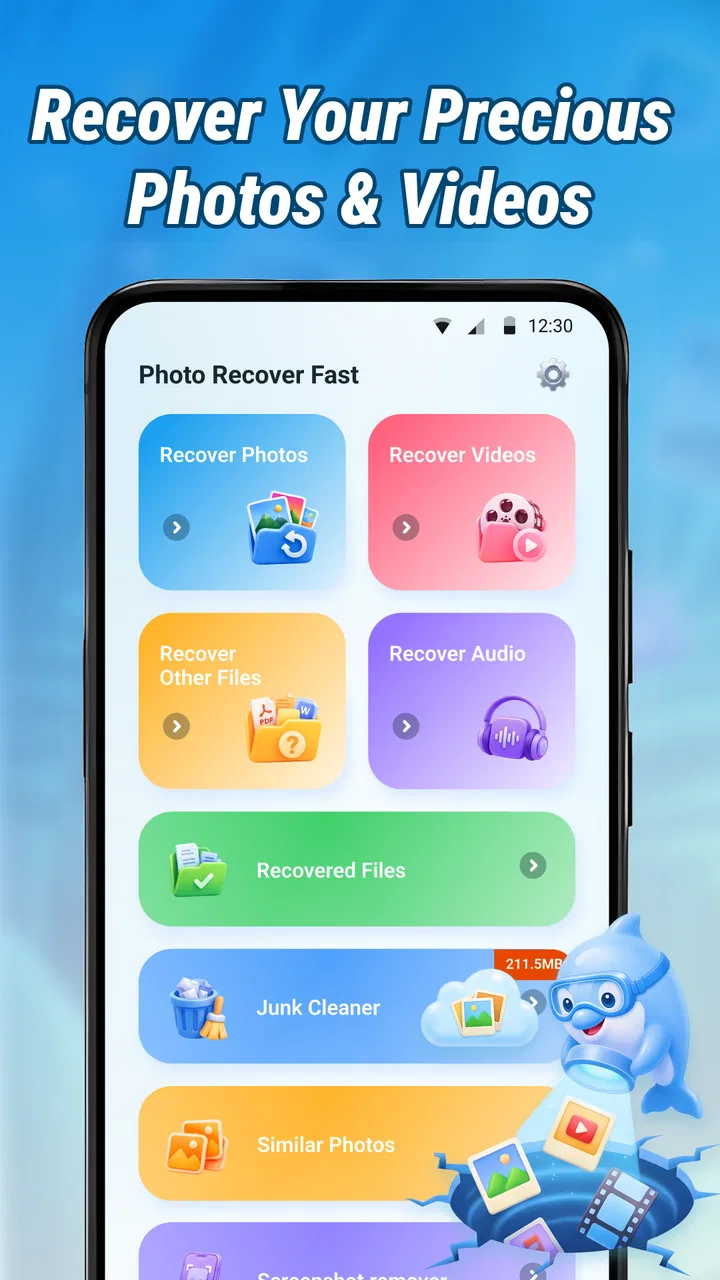
The first thing I appreciate is the narrow focus. Photo Recover Fast is not presented as a general phone optimizer, cloud gallery, messaging client, or file manager. It belongs in the tools category and concentrates on finding back deleted photos and documents on an Android device. That makes the app easier to understand than utilities that combine recovery with cleaning, boosting, security, and unrelated maintenance features.
You May Also Like

 Blood Strike: 2.5 Anniversary
Blood Strike’s Loadouts Turn Every Drop Into a Tactical Gamble
A close look at Blood Strike’s custom loadouts: how fast access to signature weapons reshapes its battle royale rhythm, rewards preparation, and narrows the gap between fights.

 Pandora - Music & Podcasts
Pandora’s Music Is Easy to Start, but Harder to Recover
Pandora’s strength is its low-effort path from a seed to a station. Its weak spot is how much confidence it asks you to place in connection, setup, and quiet recovery.

 8 Ball Pool
 Is Built on Rivalries, Rematches, and Routine
A close look at the rivalries, rematches, shared routines, and unanswered safety questions that turn a quick pool match into a persistent mobile community.

 Samsung Music
’s Quiet Strength Is Playing What You Already Own
Its reach comes less from spectacle than from dependable access to a personal library. That simplicity is both the app’s strongest retention engine and its ceiling.

 AccuWeather: Weather Radar
AccuWeather Review: A Quick, Clear Forecast for Everyday Decisions
For everyday plans, the best forecast is the one you can understand quickly. AccuWeather makes rain timing, radar, and local conditions easy to act on, with a few trade-offs.

 Hill Climb Racing
Why Hill Climb Racing Still Turns Crashes Into One More Run
A tiny car, a bumpy hill and one more upgrade: Hill Climb Racing keeps resurfacing because its simple chaos makes every near-miss feel personal.
More From Our News Desk



Its short store description, “Photo Recover Fast,” sets the tone: this is meant to be approached as a quick first attempt. I would open it soon after noticing a deletion, select the relevant recovery path, and inspect what it can find before making more changes to the phone. That order matters because continued use can create new files and gradually make old deleted data harder to recover.
One realistic example is a work document removed while clearing space before a trip. I might first stop downloading images, pause automatic media-heavy activity, open the recovery tool, and search for the missing file. If the document is visible, I would preview it carefully and save the recovered copy somewhere easy to identify. If it is not there, I would move to the phone’s recycle bin, gallery trash, file manager, or an existing backup instead of repeatedly scanning without a plan.
The most useful mindset is to treat this app as an early recovery attempt, not as a promise that every deleted file can return. Recovery depends on what happened after deletion, where the file was stored, and whether the device has already reused that space. The app can be convenient, but it cannot change those underlying conditions.
Connectivity can shape the moment without defining it
When a file disappears, I usually want to act immediately, whether I am at home, on public transport, or somewhere with an unreliable signal. A recovery tool is therefore judged partly by how much of the process feels self-contained and how much of the surrounding experience depends on connectivity. I would not assume that every function works without a connection, so I would avoid promising myself a fully offline workflow before testing it on the device I actually need to recover.
That practical uncertainty does not make the app unusable. It simply changes how I prepare. If I am dealing with an important document, I would keep the phone charged, avoid switching between many network-heavy apps, and make sure I have enough local storage for possible recovered copies. If the app needs an online step at any point, a stable Wi-Fi connection may make the process less frustrating than trying it during a weak mobile-data session.
There is also a privacy angle to consider. Deleted photos and documents can be personal, financial, or work-related. Before using any recovery utility, I would read the screens carefully and pay attention to where recovered files are being saved or shared. I would prefer to inspect results on the phone first and only move them to another service when I have decided that the destination is appropriate. The app’s simple purpose is attractive, but simplicity should not replace careful handling of sensitive files.
Why timing matters more than a fast-looking interface
The word “Fast” in the app’s name may suggest speed, but I would separate a quick interface from a quick recovery result. A short scan can be convenient, yet a missing file may require patience or may not be recoverable at all. I would begin with the lightest search that matches the problem, review the results, and avoid saving a large number of unnecessary files during the first attempt.
A useful habit is to record the original file name, approximate folder, and date before starting. Even a rough memory helps distinguish the document I need from thumbnails, duplicates, or similarly named images. If the app presents many results, this small preparation can save time and reduce the chance of restoring the wrong item.
I would also avoid taking new photos or recording video immediately after an accidental deletion. New media can occupy storage that previously held fragments of the deleted file. This is not a special feature of Photo Recover Fast; it is a general recovery principle that makes the app’s timing more important. Opening it promptly gives the best practical chance of finding something useful.
Using it in different mobile contexts
At home, I would use the app with the phone connected to power and with a clear amount of free space available. Recovery work can produce copies, previews, or temporary files, so beginning with a nearly full device is a poor setup. I would also close unrelated apps to keep the process easier to follow and reduce accidental interruptions.
On a commute, the situation is different. I may have limited battery, unstable connectivity, and little time to inspect results. In that setting, I would use the app mainly to check whether the missing item appears at all, then postpone detailed sorting until I am somewhere comfortable. I would not start a long, uncertain recovery session just before reaching a destination or when the phone is close to shutting down.
For travel, the best use case is a recently deleted photo that has emotional value but no backup immediately available. I would stop capturing new media, run the recovery attempt, and create a clearly named copy if the result appears. I would then back up that copy through my normal method once I have a dependable connection. This two-stage approach prevents the recovery tool from becoming the only place where the restored file exists.
In a workplace, I would be more cautious. A deleted personal image is one thing; a missing contract, scanned receipt, or customer document may involve confidentiality. I would avoid experimenting on a shared or managed device without permission. If the file is business-critical, a company backup or administrator-supported process may be safer than relying only on a consumer recovery app.
What happens when the first attempt fails
Failure is the part of recovery software that deserves the clearest expectations. Photo Recover Fast may not find a file that has been permanently removed, overwritten, stored in a location it cannot inspect, or moved through an app that handles its own private storage. A blank result is disappointing, but it does not automatically mean the phone was searched in every possible way or that the file never existed.
If the first search fails, I would check the gallery’s recently deleted area, the file manager’s trash, messaging conversations, email attachments, and any cloud photo service I already use. I would also search for alternate copies: an edited version, a screenshot, a sent attachment, or a document exported under a different name. These routes are often more reliable than repeatedly scanning the same device.
There is a trade-off between trying again and making the situation worse. Continued phone use can overwrite recoverable fragments, while repeated scans may consume time and create confusing duplicates. I would make one organized attempt, note the results, then decide whether a backup, another device, or professional recovery is more appropriate. For a valuable file, a desktop recovery service or specialist may be the better choice, even if it is less convenient.
When recovery succeeds, I would verify the restored file before deleting anything else. For a photo, I would open it fully and check for damaged sections. For a document, I would inspect several pages and confirm that it opens in the expected app. A file that appears in a result list is not necessarily a complete, usable copy. I would also rename the recovered version with a clear label and place it in a known folder so that I do not accidentally mistake it for the original.
Keeping the process data-conscious
Because this is a tool for personal files, I would use it with a deliberately narrow workflow. I would search for the specific missing item, avoid restoring every result automatically, and remove unwanted recovered copies afterward. This reduces clutter and makes it easier to tell which version is genuine.
Storage management matters too. If the phone is almost full, recovery can become awkward because there may be nowhere to save a successful result. I would first remove only safe, replaceable clutter or move existing media to a trusted location. I would not erase more files in a rush, since aggressive cleanup immediately before recovery can create additional problems.
Connectivity should be handled with the same care. I would not assume that using mobile data is necessary for every part of the process, but I would be ready for a connection-dependent screen if one appears. If the app offers any result-sharing or upload step, I would choose it only after reviewing the destination. For sensitive documents, keeping the recovered copy local until I can make an informed backup is the more comfortable approach.
Another useful tip is to separate recovery from organization. First, identify and preserve the needed file. Later, when the situation is calm, sort duplicates, rename images, and create a backup. Trying to clean the entire phone while recovering one deleted document increases the chance of selecting the wrong item or removing something still needed.
Where it beats usual alternatives, and where it does not
Compared with checking a gallery trash folder, Photo Recover Fast offers a broader first step for someone who cannot find the item through the normal interface. A trash folder is usually easier and more predictable when the file is still inside its retention period, so I would always check it first. The recovery app becomes more interesting when that obvious route is empty or when the missing item was a document rather than a standard gallery photo.
Compared with restoring from cloud backup, the app is useful when no current backup exists or when the backup is incomplete. Cloud services are generally better for long-term protection because they preserve copies before deletion becomes a problem. Recovery software is a rescue tool; backup is prevention. I would not replace a dependable backup routine with this app.
Compared with desktop recovery programs, this Android app is more convenient because it starts on the device where the deletion happened. That convenience is valuable during travel or when I do not have a computer nearby. Desktop tools may offer more control in difficult cases, though, particularly when the storage structure is complex or the file is especially important. The choice depends on the value of the data and how much technical effort I am willing to accept.
Compared with a general file manager, Photo Recover Fast has a clearer recovery purpose, while a file manager is better for browsing folders, locating renamed copies, and checking trash locations. I see the two as complementary rather than interchangeable. The recovery app helps with the missing-file problem; the file manager helps me understand where the surviving copies are.
Who should try it and who should skip it
I think this app is a sensible first try for Android users who have recently deleted a photo or document and want a focused tool without paying upfront. It is especially suitable for casual users who do not want to connect the phone to a computer before checking whether a recoverable result is available. The Everyone age rating also makes its intended audience broad, although responsible handling is still important when the files are private.
I would be less enthusiastic for someone who already has a complete, recent backup. In that case, restoring the file from the backup may be cleaner and more reliable than scanning. I would also skip relying on it as the only plan for irreplaceable business records, legal documents, or large collections of media. Those situations call for prevention, redundancy, and possibly specialist help.
Users with very limited storage or a nearly empty battery should prepare before starting. The app may be free to install, but the surrounding recovery task still has practical costs in time, storage, attention, and possibly connectivity. Free does not mean risk-free: the real risk is losing time or creating confusion by saving many uncertain results without checking them.
Version, maturity, and everyday expectations
The current version is 1.5.0.0, and the app was released on May 13, 2026. I would keep it updated through the normal app channel, especially for a tool that interacts with changing Android storage behavior. Android versions handle access to files differently, so compatibility can affect what a recovery utility can see on a particular phone.
It supports Android 7.0 and later, which gives it a wide potential range of devices. Still, the same recovery result should not be expected across every model or Android release. A newer phone may restrict access more tightly, while an older device may have different storage behavior. I would judge the app by a small, low-stakes test or by a realistic recovery attempt rather than assuming that its performance on another phone will match mine.
The rating of 4.0 from roughly one hundred eighty ratings gives me a balanced impression rather than a reason to expect miracles. With about twenty written reviews, there is enough public feedback to suggest real use, but not enough for me to treat every possible device and deletion scenario as thoroughly represented. I would read recent comments for clues about the Android version and file type involved in similar cases.
My connectivity verdict
Photo Recover Fast works best when I use it as a calm, immediate response to accidental deletion: stop creating new files, prepare the phone, run a focused search, inspect the result, and preserve anything useful. Connectivity is part of the practical experience because some mobile situations are unstable and because recovered personal files deserve careful handling, but I would not make assumptions about offline operation or treat a network connection as a substitute for a backup.
What I like most is the low barrier to trying a focused recovery route on the Android device itself. What keeps my expectations measured is the nature of deletion: no app can guarantee that a file remains recoverable after storage has been reused or when the original copy was handled by another service. For recent, ordinary losses, this free tools app is worth a careful first attempt. For critical files, I would pair it with the phone’s trash folders, existing backups, and a more specialized option when necessary.
My final recommendation is therefore practical rather than absolute. Install it as a possible rescue tool if accidental deletion is a recurring worry, but use it promptly and selectively. Keep recovered files backed up afterward, avoid uploading sensitive material casually, and do not continue filling the phone while searching. With those habits, Photo Recover Fast can be a useful part of an Android recovery plan, even though it should never be confused with a guaranteed replacement for prevention.
FAQs for Photo Recover Fast
01What is Photo Recover Fast, and what does it do?
Photo Recover Fast is designed to help users search for and restore deleted or missing photos from an Android or iOS device, depending on the version available. After installation, it typically scans accessible storage for recoverable image files and presents matching results for review. Its success depends on how the files were deleted, how much the device has been used since deletion, and the permissions granted.
02Can Photo Recover Fast recover every deleted photo?
No recovery application can guarantee that every deleted image will be restored. Photo Recover Fast may work best when you scan soon after deletion, before new files overwrite the same storage space. Results can also vary according to the device, operating system, storage type, backup settings, and whether the photo was permanently removed. Some recovered files may be incomplete, duplicated, or lower quality.
03Does Photo Recover Fast require root access or special permissions?
The permissions required may differ between Android and iOS versions. Basic scans can often use access to photos, media, or device storage, while deeper Android scans may request additional access or root privileges. iOS generally limits direct access to deleted files, so recovery may depend on Recently Deleted items or available backups. Review every permission request carefully before allowing access.
04Is Photo Recover Fast free to use, and are there in-app purchases?
The application may offer free installation while reserving certain recovery tools, unlimited scans, or exporting features for a premium plan. Advertising and in-app purchases can also vary by platform and region. Before starting a scan, check the store listing and the payment screen for subscription terms, trial periods, renewal dates, and cancellation instructions so you understand the total cost.
05Is it safe to use Photo Recover Fast for private photos?
Because a recovery tool may need access to personal images and device storage, privacy should be considered before installation. Download Photo Recover Fast only from an official app store, read its privacy policy, and verify what data is collected or uploaded. Avoid granting unrelated permissions, and do not share recovered images through the app unless you trust its handling and security practices.
Pros
- Quickly scans device storage for recently deleted photos.
- Simple interface makes recovery easy for non-technical users.
- Supports previews before selecting files to restore.
- Can recover multiple images in a single scan.
- Useful for checking recoverable media without complex setup.
Cons
- Recovery success depends on whether deleted data has been overwritten.
- May not restore photos from securely erased or formatted storage.
- Scans can take longer on devices with extensive storage.
- Recovered files may lose original names
- folders
- or metadata.
- Results can include duplicates
- thumbnails
- or unrelated cached images.

Photo Recover Fast
Gallery